
Find Google Ads opportunities
Your organic keywords are a list of searches that already bring engaged visitors. Some of them are missing from your Google Ads campaigns. This guide lines up the two lists in a spreadsheet and finds the gaps.
Time: about 30 minutes · You need: Google Ads linked to your original Google Analytics property, and Google Sheets or Excel
1. Export the organic keywords
Section titled “1. Export the organic keywords”- Open the Keyword Hero report through View in Google Analytics.
- Change the secondary dimension to
search_position_dimension. - Set the date range.
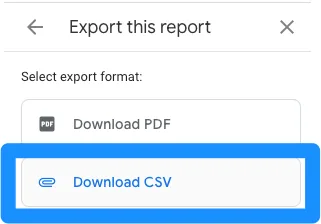
- Click the Share this report icon, then Download file → Download CSV.
2. Export the paid queries
Section titled “2. Export the paid queries”Switch to your original Google Analytics property, the one Google Ads is linked to. Keyword Hero’s property has no Ads data, and should not.
-
Open the Google Ads campaigns report.
-
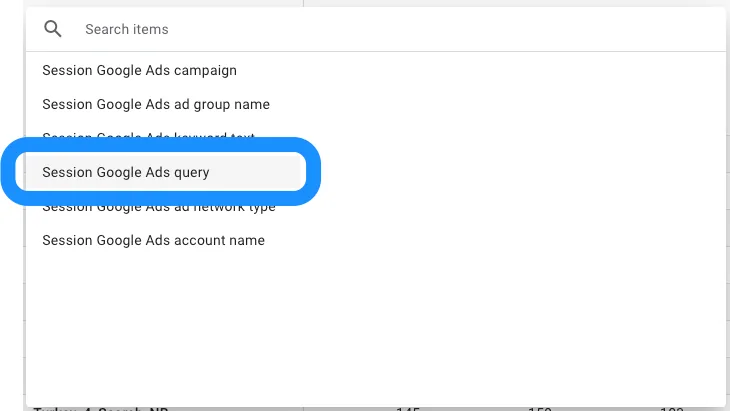
Change the primary dimension to Session Google Ads query.
-
Set the same date range as in step 1.
-
Export it as CSV the same way.
3. Put both in one spreadsheet
Section titled “3. Put both in one spreadsheet”Import each file into its own tab, for example organic keywords and paid
keywords. In the organic tab, add a column for engagement rate:
engaged_sessions / sessions. Sort by it, or by conversions if you track
them.
4. Find the organic keywords Ads does not cover
Section titled “4. Find the organic keywords Ads does not cover”In the first empty column of the organic tab, enter:
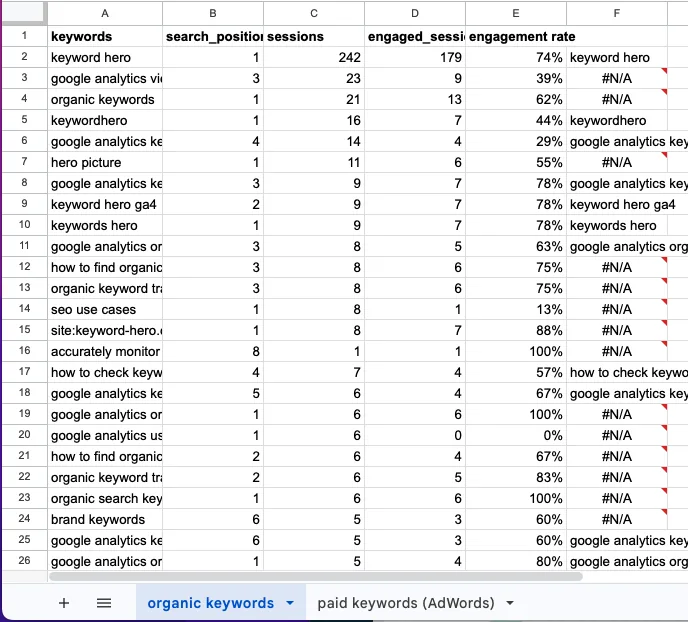
=VLOOKUP(A2, 'paid keywords'!A:A, 1, FALSE)A2 is the first organic keyword, 'paid keywords'!A:A is the column of paid
queries, and FALSE asks for an exact match. Fill the formula down.
- The keyword appears: your campaigns already cover it.
#N/Aappears: they do not.
5. Pick the candidates
Section titled “5. Pick the candidates”Among the #N/A rows, keep the keywords with high engagement or conversions.
They already bring the right visitors organically; bidding on them can take
the space above your organic result too.