
Find your money keywords
A keyword that brings a thousand visits and no sales is worth less than one that brings ten visits and three orders. This guide finds the second kind.
Time: about 20 minutes · You need: key event or ecommerce tracking (a paid plan), and a few weeks of data
Before you start
Section titled “Before you start”Without key event tracking there are no conversions to sort by. If you do not have it, skip to step 4.
1. Sort by results, not by traffic
Section titled “1. Sort by results, not by traffic”In the app: open the Overview and click the conversions or revenue column header in the keyword table. Click again to reverse the order.
In Google Analytics: open the Keyword Hero report through View in Google
Analytics. Remove the landing_page secondary dimension with its x, so
each keyword is one row. Then click the conversions or total_revenue
column header.
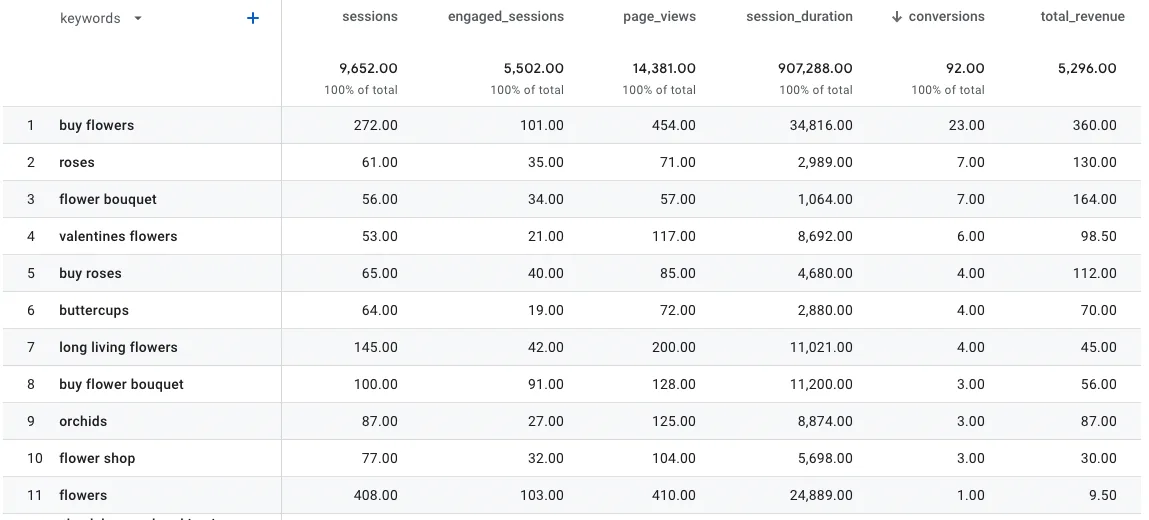
In this flower shop, “buy flowers” leads on sales and on traffic. “flower bouquet” and “roses” convert far better than the generic “flowers”.
2. Read the pattern, not the top row
Section titled “2. Read the pattern, not the top row”Look across the top twenty for what the converting keywords have in common. Two patterns come up again and again:
- Transactional words. Keywords with buy, order or price convert at several times the rate of informational ones. The search intent column in the app marks them with T.
- Specific products. In the example, searches for bouquet spent more than twice as much per order as searches for single flowers.
Each pattern is a content decision: write for the transactional query, and build the page for the visitor who already knows what they want.
3. Drill into one landing page
Section titled “3. Drill into one landing page”Pick a landing page with high revenue and look at every keyword that reaches it.
In the app: open the Landing Page report.
In Google Analytics: keep keywords as the primary dimension and
landing_page as the secondary. Edit the filter and add the condition
landing_page exactly matches your page, keeping medium = organic and
source = google. Choose Apply, then sort by conversions.
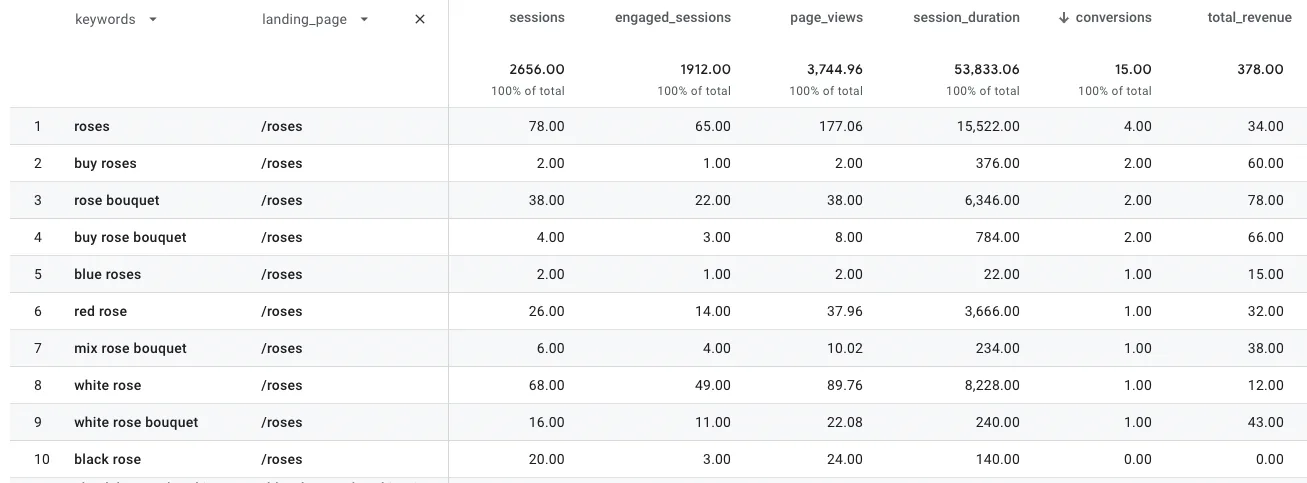
A keyword with few sessions but a conversion is worth a second look: it may
rank poorly for a term that sells well. Check its position in the
search_position_dimension column.
For deeper splits, such as transactional against informational keywords, export the table to a spreadsheet.
4. When there are too few conversions
Section titled “4. When there are too few conversions”Small sites and new setups often have too few conversions to rank keywords by. Use a signal that happens more often:
- An earlier step in the funnel. Add to cart or begin checkout instead of purchase. Mark it as a key event and track it.
- Engagement. Sort by engagement rate (
engaged_sessionsdivided bysessions) or by session duration. Both tend to move with conversions, and even a little data shows the trend.
Check it worked
Section titled “Check it worked”You have a short list of keywords that convert well above your average, and a note of which pages they land on. Those are the keywords to protect, and the patterns to write more content for.