
Where your data lives
Keyword Hero writes your keyword data to two places, and Looker Studio can read from one of them. They hold the same keywords, but not the same extras, and they do not count dates the same way.
| Keyword Hero app | Keyword Hero property in GA4 | Looker Studio | |
|---|---|---|---|
| Keywords, sessions, conversions, revenue | Yes | Yes | Yes, through the GA4 property |
| Search intent | Yes | No | No |
| Historical data | Yes | No | No |
| Dates | Real dates | Three days behind, use the date dimension |
As in GA4 |
| Who can see it | The Google account that set it up | Anyone with access to the property | Anyone you share the report with |
| After you cancel | Gone | Stays in your Google Analytics | Stays, as long as the property does |
The app
Section titled “The app”The reports in Keyword Hero itself. This is the only place with search intent and with the historical data you load after setup. Access is tied to the Google account that set up the project; see Share data with your team for the ways around that.
The Keyword Hero property in Google Analytics
Section titled “The Keyword Hero property in Google Analytics”During setup Keyword Hero creates a separate GA4 property, Keyword Hero property (GA4) – your property name, and uploads your keyword data to it once a day. It copies your original property’s data and adds the keywords and a set of custom dimensions and metrics, listed in The Keyword Hero property.
Your original property is not touched. That is the reason the property exists: nothing Keyword Hero does can affect your main data.
To open it, open the project in the app and choose View in Google Analytics, at the bottom left, or the three-dot menu at the top right. Going through the app opens the report with the right settings. Save it once, as described in Save the report in GA4, and you can open it directly afterwards.
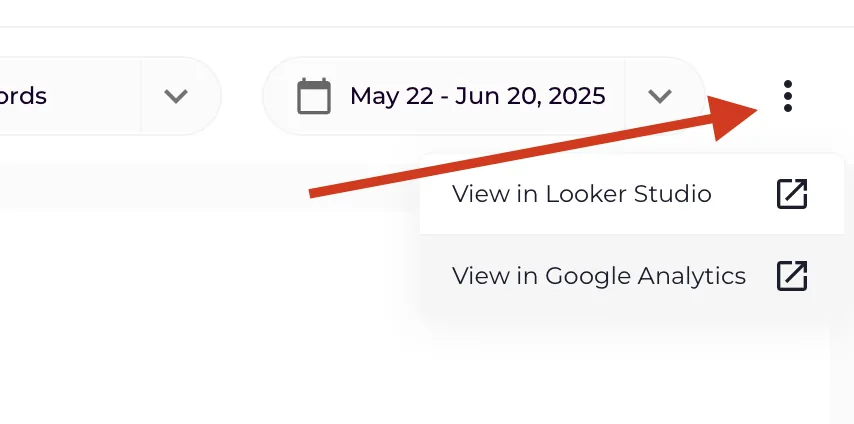
The data stays in your Google Analytics account for as long as you keep the property, even after you cancel Keyword Hero.
Looker Studio
Section titled “Looker Studio”Looker Studio reads the Keyword Hero property through Google’s own Google Analytics connector. Anything in the property can go into a dashboard, and nothing that is only in the app can. See Connect Looker Studio.