
Fix keyword cannibalization
When several of your pages rank for the same keyword, they split its traffic, and usually only one of them serves the searcher well. Keyword Hero shows how each page performs for the same keyword, so you can tell which one to keep.
Time: about 15 minutes per keyword · You need: a few weeks of data
1. Pick a keyword
Section titled “1. Pick a keyword”Start with your highest-traffic keywords. Cannibalization costs most where the traffic is.
2. List the pages it lands on
Section titled “2. List the pages it lands on”In Google Analytics: open the Keyword Hero report through View in Google Analytics.
- Edit the filter. Keep
medium = organicandsource = google, and addkeywordsexactly matches your keyword. - Choose Apply.
- Make sure that
landing_pageis the secondary dimension.
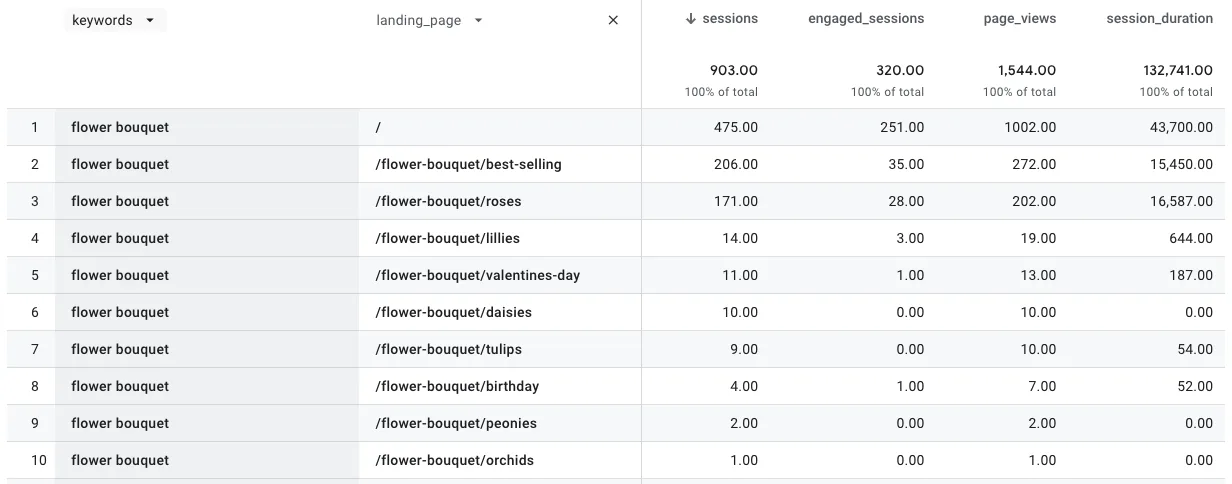
About 53% of this keyword’s sessions land on the homepage. The other 47% spread across nine pages, and none of those engage visitors as well.
3. Compare the pages
Section titled “3. Compare the pages”Compare engagement rate (engaged_sessions divided by sessions), session
duration and conversions per page. One page usually stands out. The others do
not match what the searcher wanted.
4. Point the keyword at one page
Section titled “4. Point the keyword at one page”Make the winning page the obvious answer, and the others clearly about something else:
- Differentiate the weaker pages, so they target their own queries.
- Link from the weaker pages to the winner, with the keyword in the link text.
- If a weaker page has no other purpose, merge it into the winner and redirect it.
Check it worked
Section titled “Check it worked”After a few weeks, repeat step 2. A larger share of the keyword’s sessions lands on the page you chose.