
Connect Looker Studio
Looker Studio reads your keyword data from the Keyword Hero property in Google Analytics. There is no separate Keyword Hero connector: you use Google’s own Google Analytics connector and point it at the right property.
Time: about 10 minutes · You need: read access to the Keyword Hero property, and a Google account for Looker Studio
Before you start
Section titled “Before you start”- Only what is in the property reaches Looker Studio. Search intent and historical data live in the app only. See Where your data lives.
- Mind the three-day lag. Use the
datedimension, not Looker Studio’s default date, when you chart data over time. See Data freshness.
1. Open Looker Studio from the app
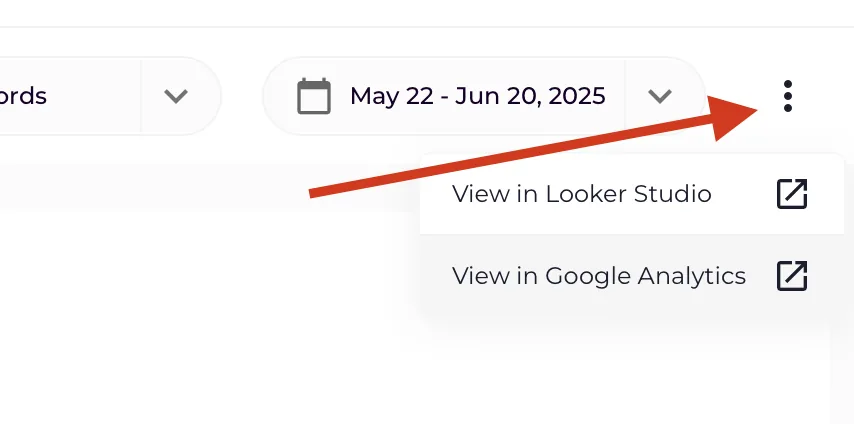
Section titled “1. Open Looker Studio from the app”Open the project in the app and open the three-dot menu at the top right. It links to Looker Studio as well as to Google Analytics.
2. Add the Keyword Hero property as a data source
Section titled “2. Add the Keyword Hero property as a data source”- In Looker Studio, choose Create → Data source.
- Choose the Google Analytics connector, and allow access if Looker Studio asks.
- Select the account that holds the Keyword Hero property, then the property Keyword Hero property (GA4) – your property name.
- Choose Connect.
- Do not change the fields on the next screen. Choose Create report, or save the data source to use it in several reports.
Give the data source a name you will recognise, such as Keyword Hero. Looker Studio otherwise names it after the property.
3. Use the Keyword Hero fields
Section titled “3. Use the Keyword Hero fields”The custom dimensions and metrics Keyword Hero adds to the property appear in the field list, under the names in The Keyword Hero property. The ones you will use most:
| Field | Type | Use it for |
|---|---|---|
keywords |
Dimension | The search term |
landing_page |
Dimension | The page the visitor arrived on |
search_position_dimension |
Dimension | The Google position behind the session |
brand_classification |
Dimension | Brand or generic |
date |
Dimension | The real date of the session |
sessions, engaged_sessions |
Metric | Traffic and engagement |
conversions, total_revenue |
Metric | Results, attributed to the keyword |
Check it worked
Section titled “Check it worked”Add a table with keywords as the dimension and sessions as the metric, and
set the date range to a few days that are at least three days old. The figures
match the Keyword Hero report in Google Analytics for the same days.