
Find quick-win keywords
Position 10 is the bottom of Google’s first page. Position 11 is the top of the second, and the traffic difference between the two can be tenfold. A keyword that already ranks on 11 to 14, and already converts, is the cheapest traffic gain on your website.
Time: about 15 minutes · You need: a few weeks of data
1. Find the keywords near page one
Section titled “1. Find the keywords near page one”In the app: open the Quick Wins report.
In Google Analytics: open the Keyword Hero report through View in Google Analytics.
- Edit the filter. Keep
medium = organicandsource = google, and addsearch_position_dimensionmatching11,12,13and14. - Choose Apply.
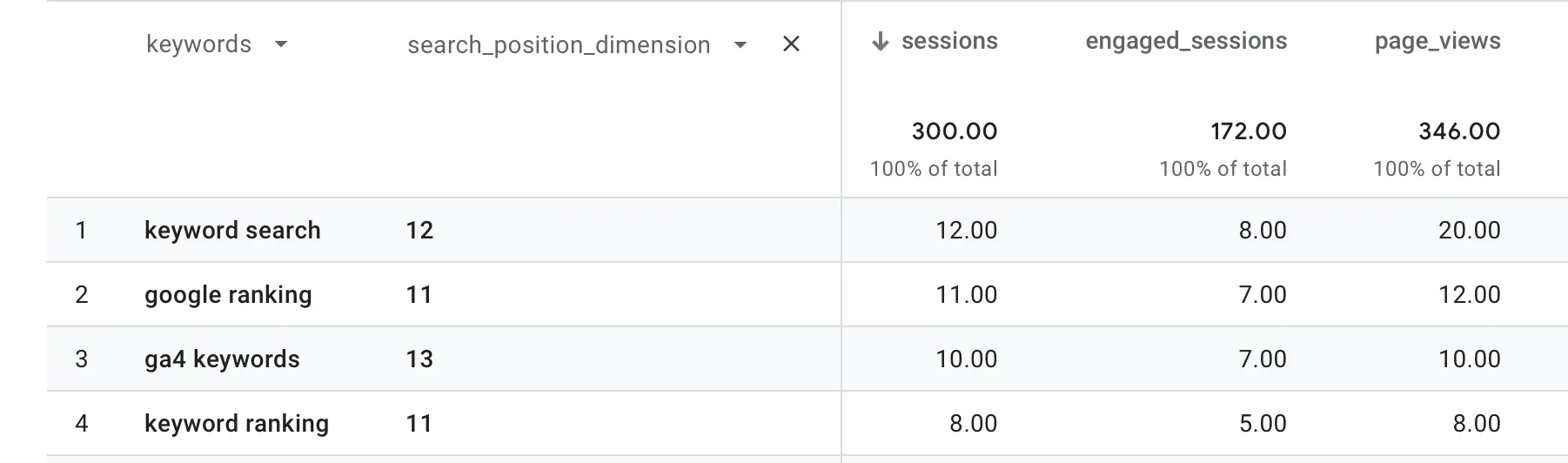
A keyword can appear on several positions, because the position is recorded
per session. To see one row per keyword, remove search_position_dimension as
the secondary dimension and keep the filter.
2. Keep the ones worth pushing
Section titled “2. Keep the ones worth pushing”Sort by conversions, total_revenue or engagement. Keep keywords that:
- already convert, or engage well above your average, and
- have commercial or transactional intent. See Search intent.
High traffic on position 12 with no conversions is not a quick win. It is a page that does not match what the searcher wanted.
3. Act on them
Section titled “3. Act on them”Improve the page that ranks: answer the query more directly, add internal links to it from strong pages, and update the content. Then watch the keyword over time.
Check it worked
Section titled “Check it worked”Within a few weeks the keyword’s sessions shift to positions under 10 in
search_position_dimension, and its sessions grow.